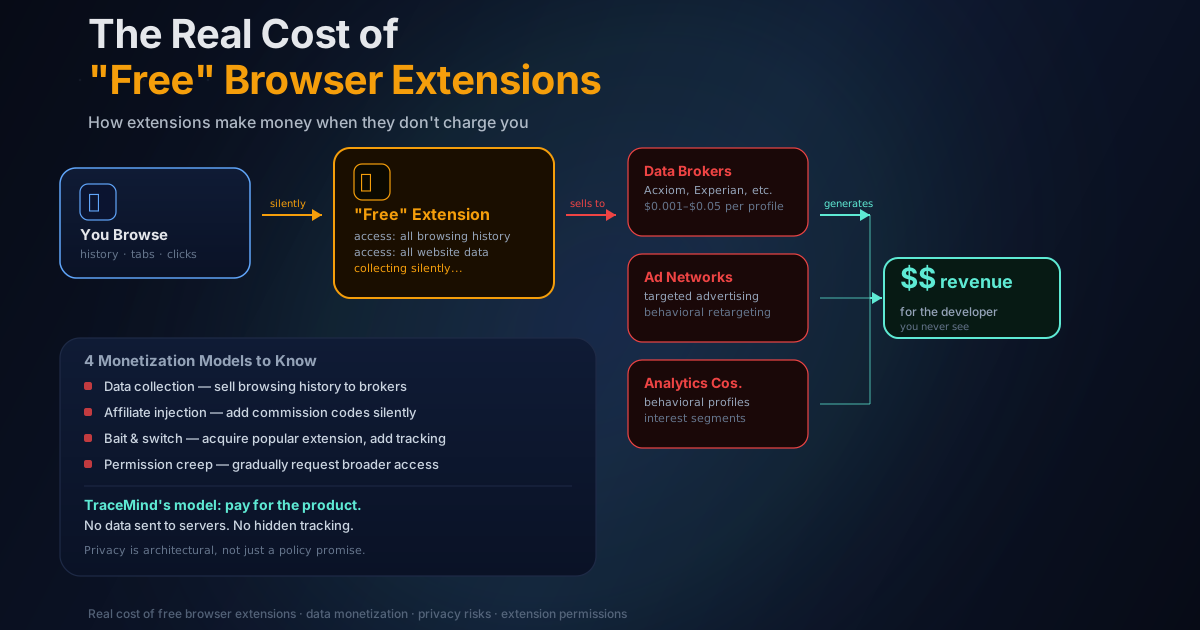
The Real Cost of "Free" Browser History Tools
There's an old saying in tech: if you're not paying for the product, you are the product. Browser extensions are where this plays out most clearly, because they sit inside the most intimate software on your computer.
I've spent time researching competitors while building TraceMind, and the patterns I've found are worth explaining. Once you see how these business models work, you'll think differently about what you install.
The Business Models Nobody Tells You About
Data collection: the invisible trade
The most common model for free tools with access to your browsing history is straightforward: collect data, sell it.
An extension that sits in your browser can observe your browsing habits, infer your demographics and interests, and build a behavioral profile over time. This profile gets sold to advertisers, data brokers, or analytics companies. You get a free tool. They get a detailed picture of what you read, what you search for, what products you look at, and what kind of content you spend time on.
What bugs me most about this is how invisible it is. There's no notification when data leaves your browser. The extension works normally. It just also happens to be sending your browsing behavior to a server somewhere. You'd never know unless you monitored network traffic yourself.
This isn't hypothetical. Avast's antivirus subsidiary Jumpshot was caught selling detailed clickstream data from millions of users, including browsing history with enough granularity to identify individuals. Avast shut down Jumpshot in 2020 after the story broke, but the data had already been sold. Similar issues have been documented with browser extensions specifically — there's a well-known 2019 investigation by ProPublica and Motherboard that found multiple popular extensions collecting and selling browsing data while claiming to be privacy tools.
Affiliate injection: money from your purchases
The second model is less invasive but still happens without your knowledge or consent.
The extension watches for shopping or travel sites. When you visit Amazon, eBay, airline booking pages, or hotel sites, it quietly redirects your purchase through an affiliate link. You pay the same price. The extension maker gets a commission.
Honey (now owned by PayPal) has faced scrutiny for something adjacent to this: allegedly replacing creator affiliate codes with its own codes at checkout. The mechanism differs slightly, but the outcome is the same. Someone is earning money from transactions you'd have made anyway, without you ever knowing.
The bait and switch: safe until it isn't
This is the one I find most insidious. A developer builds something genuinely useful. They grow a user base. They sell the extension to a company with different intentions.
The new owner ships an update. Maybe it adds tracking, maybe it injects ads, maybe it quietly enables data collection. By then, most users have forgotten the extension exists. It's just running in the background, now doing things the original developer never intended.
I've seen this cycle happen multiple times with popular history and productivity extensions. The user base is the asset being acquired. Not the code. The code could be rewritten in a week. What's worth money is access to hundreds of thousands of installed browsers.
Chrome even lets you check extension ownership. If you go to the extension's store listing and the publisher has changed, or if the "About" link points to a domain registered six months ago, that's worth investigating before the next update lands.
Permission creep: the slow expansion
Extensions start with minimal permissions. Over time, they request more through updates. Each individual request seems reasonable. You click "Accept" without thinking much about it. Eventually the extension has access to everything.
This works because Chrome shows permission change notifications, but most users dismiss them reflexively. The extension has trained you to trust it. One more permission doesn't seem like a big deal.
What most people don't realize is that a single permission — "Read and change all your data on all websites" — covers nearly everything an extension could want to do maliciously. It can read page content, inject scripts, modify what you see, and monitor your activity across every site you visit.
How to Evaluate a Free Extension in 5 Minutes
Before installing anything, go through this:
1. Who owns it? Look for a real company name, a working website, a support email, and a privacy policy. If the developer section is vague, anonymous, or links to a generic portfolio site, that's a flag.
2. What's the actual business model? If it's free, how does the developer pay rent? Look for a premium tier, a clear enterprise product, or an open-source project with a named institutional backer. "Partnerships" and "analytics" in a privacy policy are code for data monetization.
3. What permissions does it request? The Chrome Web Store shows permissions before you install. For a history tool, you'd expect to see:
- "Read your browsing history" (obviously required)
- "Storage" (to save its local index)
You would not expect to see "Read and change all your data on all websites" for a history search tool. That permission lets the extension interact with every page you visit. Why would a history tool need that?
4. How old is it, and who are the recent reviewers? Look for patterns: complaints about new ads, redirects, or behavior changes after an update. A sudden influx of five-star reviews with generic text after an ownership change is another red flag.
5. Has it been in the news? A quick search for "[extension name] privacy" or "[extension name] data" takes 30 seconds and can surface issues the store listing won't mention.
The Permission Breakdown for History Tools Specifically
Since we're talking about browser history extensions, it's worth being specific about what permissions are actually necessary.
| Permission | Needed for history search? | Why someone might request it |
|---|---|---|
| history | Yes | Core functionality |
| storage | Yes | Save local index |
| tabs | Sometimes | Capture active tab URL in real time |
| activeTab | Sometimes | Access currently active page |
| scripting or <all_urls> | No | Inject scripts into every page you visit |
| webRequest | No | Intercept and modify network requests |
| cookies | No | Access session cookies |
If a history extension is asking for scripting with broad host access or webRequest, those permissions go well beyond history indexing. They're what you'd need to do affiliate injection, ad insertion, or data exfiltration.
What TraceMind Requests (And Why)
I want to be direct about this since I'm the one making the argument.
TraceMind requests history, storage, and tabs. The history permission reads your browsing history. The storage permission saves the semantic index (using IndexedDB) and compressed page snapshots (using lz-string at 50-70% compression). The tabs permission captures page visits in real time as you browse.
Everything stays in your browser. No data is sent to any server except for one thing: Pro users have their license validated against our server. That's a one-way check that confirms the license key is valid. It doesn't send your history, your search queries, or any page content.
The semantic search model (all-MiniLM-L6-v2, 384 dimensions) runs inside your browser via WebGPU when available and WASM as a fallback. Search results are generated locally. The extension is genuinely not capable of sending your browsing history anywhere because that's not what the code does.
The reason I can do this without needing to extract revenue from your data in hidden ways is that TraceMind has a paid tier. That's the business model. Not "free with secret monetization."
For a deeper look at how to evaluate privacy claims in general, this comparison of on-device vs. cloud extensions is worth reading.
The Uncomfortable Truth About Convenience
There's real cognitive overhead to evaluating extensions before installing them. Most people don't do it. They see something that solves a problem, check the star rating, and install.
Extension developers who want to exploit this have an easy path. Build something useful, acquire users, monetize quietly. The users who care enough to investigate are a small minority, and losing them is an acceptable cost.
Honestly, I think this is one of the less-discussed risks in everyday computing. People put a lot of thought into which VPN to use or whether to enable two-factor authentication, but they'll install an extension that reads every page they visit without thinking twice about it.
Your browser is the center of your digital life. It's where you read your email, access your bank, research health questions, and do your work. What you let run inside it matters.
The free extensions that deserve your trust are the ones that show you exactly what they collect, explain clearly why they need each permission, and have a business model that doesn't depend on exploiting that access. Those exist. They're just not the default outcome.
About the Author
I've been building web applications for over four years and now focus on browser extensions. I'm the creator of TraceMind. Follow my work on GitHub.