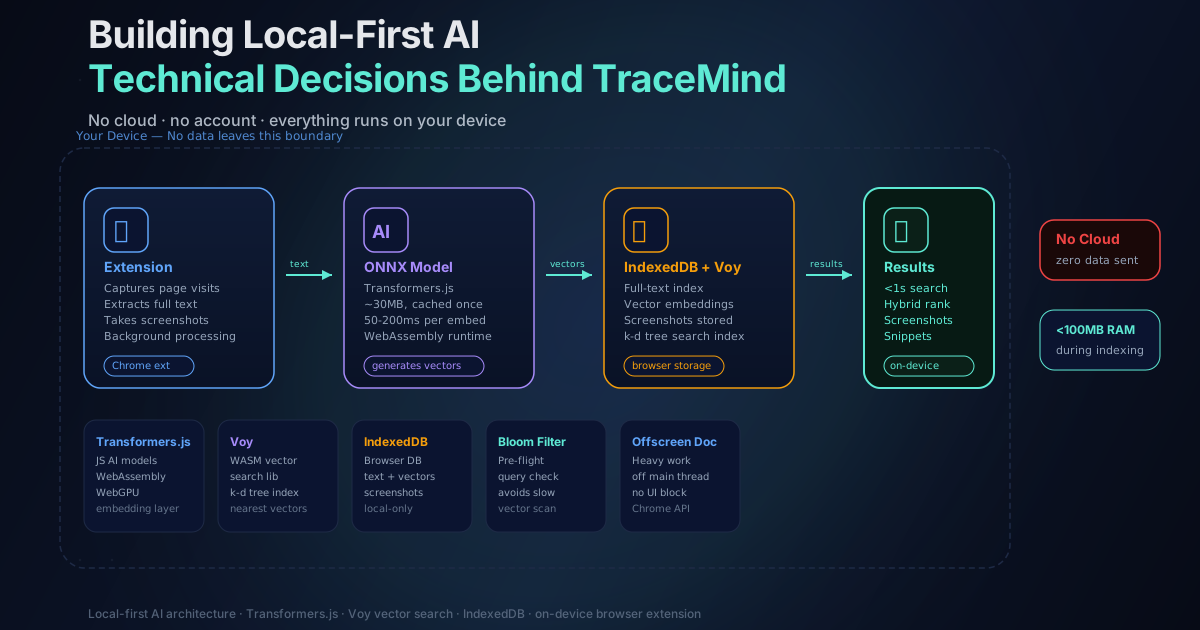
Building Local-First AI: The Technical Decisions Behind TraceMind
Updated April 2026
When I decided to build TraceMind, I had two options.
The easy path: send user data to a cloud API, run the AI there, return results. This is how most AI products work. It's faster to build, easier to scale, and the AI models are much more powerful.
The hard path: run everything locally in the browser. No servers. No data uploads. No accounts. Just the extension and whatever your computer can handle.
I picked the hard path. Here's why, and how I made it work.
Why Local-First? The Privacy Argument
The obvious reason is privacy. Browser history is genuinely sensitive data. It reveals what you're interested in, what you're struggling with, what you're planning. Sending that to a server feels wrong, even if the server is secure and the company is trustworthy.
I didn't want to be in the business of storing anyone's browsing data. I didn't want to write a privacy policy that explains why it's actually fine that we're uploading your history. I wanted to build something where the privacy guarantee is architectural, not legal.
But there's another reason. Local-first software just works better in some ways. It works offline. It works when your internet is slow. It works on a plane or in a cafe with terrible wifi. It doesn't have rate limits or usage caps determined by how much server cost the company can afford. Your data is yours, forever, stored right on your device where you can see it.
The tradeoff is technical complexity. Making AI run in a browser is harder than making API calls. Much harder, honestly.
The Foundation: Transformers.js
The foundation of TraceMind is a library called Transformers.js. It's a JavaScript port of the popular Hugging Face Transformers library, and it lets you run real AI models directly in the browser using WebAssembly and WebGPU. A few years ago this would have been science fiction. Now it's just npm install.
The specific task I needed is called text embedding. You give the model some text, and it returns a vector — a long list of numbers that represents the meaning of that text. Similar meanings produce similar vectors. So the vector for "JavaScript framework comparison" will be close to the vector for "React vs Vue analysis" even though they share almost no words.
This is what makes semantic search possible. Traditional keyword search checks whether words match. Semantic search checks whether meanings match.
Choosing the Right Embedding Model
I tested several embedding models before settling on one. The tradeoffs are always the same: bigger models are more accurate but slower and use more memory. I needed something small enough to load quickly and run on modest hardware, but good enough to actually understand what pages are about.
The model I landed on is all-MiniLM-L6-v2, which produces 384-dimensional embeddings. It sits at around 30 megabytes. It loads once when you first install the extension and then stays cached. Running a single embedding takes roughly 50 to 200 milliseconds depending on your hardware and whether WebGPU is available.
That's fast enough that you don't really notice it happening during normal browsing.
| Model property | Value | |---------------|-------| | Model name | all-MiniLM-L6-v2 | | Embedding dimensions | 384 | | Model size | ~30 MB | | Runtime | WebGPU (preferred) or WASM | | Embedding latency | 50-200ms per page | | Search latency | Under 100ms |
WebGPU runs the model on your graphics card, which is much faster than CPU inference. When WebGPU isn't available, the WASM fallback still works fine — just slightly slower on lower-end hardware.
The Hybrid Search Architecture
Pure semantic search has a weakness: if you remember an exact phrase or URL, vector similarity won't necessarily surface it first. And pure keyword search misses conceptual matches entirely.
So I built a hybrid. TraceMind combines:
- Semantic vector search: finds pages with similar meaning to your query
- FlexSearch full-text search: finds pages with exact keyword matches
- Reciprocal Rank Fusion (RRF): merges the two result lists into one ranked output
RRF works by taking each result's position in each individual ranking and computing a combined score. A page that appears at position 3 in semantic results and position 5 in keyword results will rank higher than a page that only appears in one list. It's a simple but effective way to combine rankings without needing to know how to weight the scores directly.
The practical effect: searches return sub-100ms results that handle both vague conceptual queries ("that article about rate limiting") and exact lookups ("exponential backoff algorithm") well.
Vector Search at Scale: Voy
Once you have embeddings, you need a way to search them efficiently. Comparing your query vector to every single stored vector would work for a small collection, but it gets slow once you have thousands of pages.
I use Voy, a WASM-based approximate nearest neighbor search library that builds a k-d tree index over your embeddings. It lets you find the nearest vectors without checking all of them. Because it's pure WebAssembly, it runs in any browser without CSP issues.
The result: searches stay fast even as your history grows. Instead of O(n) linear scan, Voy does O(log n) lookups.
Storage: IndexedDB
Everything is stored in IndexedDB, which is the browser's built-in database for structured data. It handles page content, embeddings, screenshots, and metadata. IndexedDB has some quirks — its async API is verbose, and it doesn't support the kind of complex queries you'd write in SQL — but it's the only real option for storing significant amounts of data locally in a Chrome extension.
I store:
- Page text: extracted with Mozilla's Readability library, same as Firefox's reader mode
- Embeddings: 384-float32 vectors per page
- Screenshots: compressed images, 320x240 on Free tier, up to 1920x1080 on Pro
- Metadata: URL, title, visit timestamp, domain, tags, notes
To keep storage lean, I apply lz-string compression to stored text, which typically achieves 50-70% size reduction. Combined with SHA-256 deduplication (so the same page isn't stored twice), the database stays manageable even over months of browsing.
The Background Processing Challenge
One challenge I didn't fully anticipate: Chrome's background processing restrictions. Extensions aren't supposed to do heavy work in the background because it drains battery and slows down the browser. But generating embeddings is inherently heavy work.
I solved this using an offscreen document — a hidden page where the extension can do intensive processing without blocking the main browser thread. Embedding generation happens in this offscreen context, so the browser UI stays responsive while indexing runs.
I also added throttling so indexing backs off when the browser is under load. The extension detects CPU pressure and defers embedding generation until things calm down. Honest result: most users never notice it's running.
Content Extraction: Mozilla's Readability
Raw HTML is noisy. Navigation menus, sidebars, footers, cookie banners — none of that should end up in the search index. If it does, search quality degrades.
TraceMind uses Mozilla's Readability library to extract the main content from pages before indexing. It's the same library that powers Firefox's reader mode. It identifies the primary article or content block, strips boilerplate, and returns clean text.
For Single Page Applications that update content without full page loads, I intercept pushState and replaceState events to detect navigation and trigger re-indexing. This handles React, Vue, Next.js, and similar frameworks that don't reload the page on route changes.
Encryption: Optional but Serious
Some users want to encrypt their stored history. TraceMind supports AES-256-GCM encryption with PBKDF2 key derivation (200,000 iterations). The key is derived from a user-set password and never stored. Without the password, the data is unreadable.
This is optional — most users don't need it. But for users who want an extra layer of protection, or who are sharing a device, it's available.
The encrypted export/import feature (Pro) uses the same encryption to protect backups. You can move your history index between devices without exposing it in plaintext.
Performance: The Numbers
After weeks of optimization, here's where TraceMind landed:
- Search latency: sub-100ms in most cases
- Memory during indexing: typically under 100MB
- Storage compression: 50-70% reduction via lz-string
- Deduplication: SHA-256 hash check before every index operation
- Embedding generation: 50-200ms per page, in background offscreen document
It's not as fast as a cloud service with dedicated GPUs. But it's fast enough to feel instant, and it runs entirely on your machine.
What I'd Do Differently
Honestly, the IndexedDB API is painful. If I were starting today, I'd look harder at OPFS (Origin Private File System) for some of the storage, which has better performance characteristics for large binary data like embeddings. The browser storage ecosystem has moved fast in the last two years.
I'd also invest earlier in the hybrid search architecture. The initial version was pure semantic search, and it was good for vague queries but frustrating when users wanted exact matches. Adding FlexSearch and RRF was the right call, but it took longer than it should have.
The Broader Point
Could I have shipped something simpler by using OpenAI's API? Yes. Would it have been more powerful? Probably. But it wouldn't have been the product I wanted to build.
TraceMind is local-first because I believe that's the right way to handle sensitive data. Browser history is intimate. The technical challenges were worth solving.
If you're building local-first AI applications, I'd recommend starting with Transformers.js. The ecosystem is maturing quickly. The hard part isn't the AI anymore — it's all the engineering around it: storage, deduplication, background processing, fallbacks, and performance tuning.
For more on the privacy implications of the on-device approach, the on-device AI explainer covers WebGPU, WASM, and why the local model approach matters for user trust.
And if you want to experience the result: TraceMind is free to install on Chrome, Brave, and Edge.
About the Author
A full-stack developer specializing in React, Next.js, and TypeScript. Currently focused on TraceMind. Follow my work on GitHub.