It was 11 PM on a Tuesday when I lost the page that would've saved my project.
I was deep into a messy CMS integration for a client, syncing data between multiple APIs and trying to make webhooks behave. The usual "this should be simple but somehow isn't" situation that eats evenings.
Earlier that day, around 3 or 4 PM, I'd found a Stack Overflow thread where someone had solved the exact problem I was stuck on. I remember thinking, I'll come back to this later, and then opening seventeen more tabs because that's what developers do.
By the time I actually needed that page, it was buried somewhere in my browser history.
So I did the ritual: Ctrl+H. Then I started guessing.
"Directus." "API sync." "Webhook." "Game provider." Nothing.
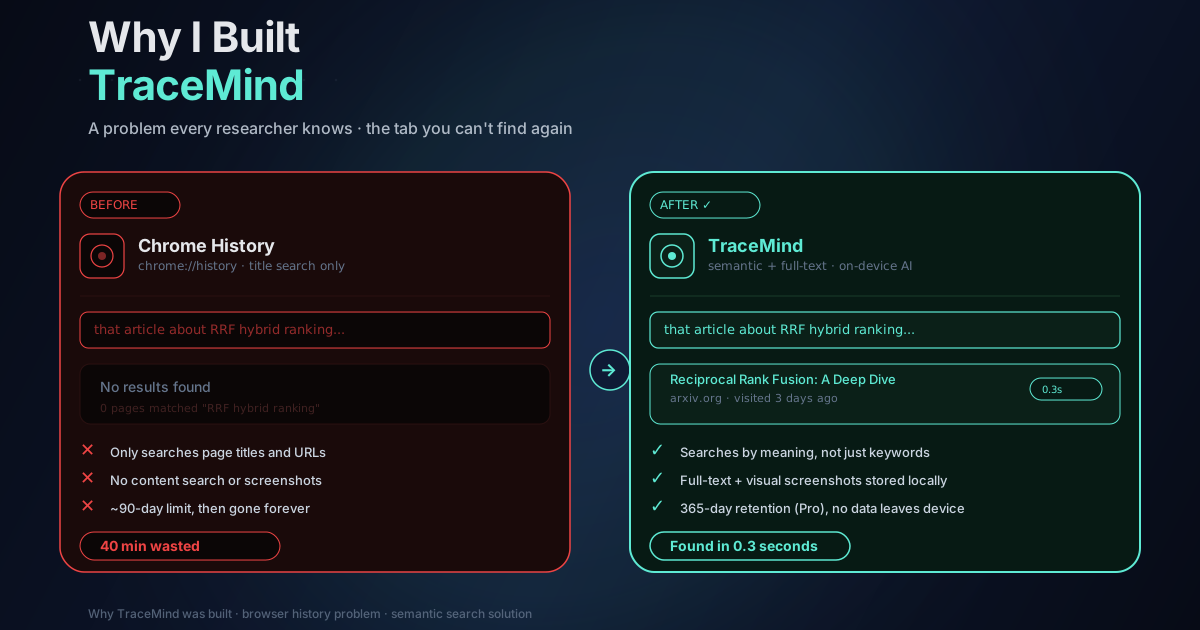
Chrome's history search only looks at page titles and URLs. Of course that perfect answer had a title like "How to handle async callbacks", which told me absolutely nothing about what was actually in the thread.
I spent forty minutes looking for something I had already found. Clicking through entries. Scanning titles. Trying to remember whether I'd opened it before lunch or after. Trying to reverse-engineer my own afternoon.
At some point I just stared at the screen and thought: this is ridiculous.
Anyway.
I gave up and solved the problem a different way. It took longer. The code was worse. And somewhere out there, that perfect Stack Overflow answer still exists... and I still haven't found it.
The Problem Isn't Memory. It's Search.
This happens to me constantly. It happens to every developer I know.
We live in documentation, blog posts, GitHub issues, random forum threads, tiny code snippets someone posted three years ago. We research all day. And then when we need to find something again, we're stuck with a history tool that basically hasn't changed since 2005.
The weird part is: I can search the entire internet in a second. But I can't search my own browsing history in a way that matches how my brain actually remembers things.
I don't remember the title. I remember the idea.
That's what bothered me most. There's something deeply wrong about being able to find any page on the internet but not being able to find a page you personally visited six hours ago.
Chrome gives you a list sorted by time with a keyword filter on top. That's it. There's no semantic understanding, no ability to describe what you're looking for in natural language, no way to search by concept. You're stuck guessing the exact title words or URL, which is precisely what you've already forgotten.
Bookmarking doesn't solve this. Bookmarks require deliberate action at exactly the moment you're least likely to take it (when you're in the middle of something and just want to keep reading). I have a bookmarks folder called "to sort" with about 200 items I've never sorted.
Re-Googling is slow and often fails. Sometimes I can reconstruct the search that found the page in the first place. Often I can't, and even when I can, the search results have changed and the page is buried or gone.
What I Actually Wanted
I wanted history search to work like this: instead of guessing the exact keywords in a page title, you type what you remember.
- "that API documentation about webhooks and async errors"
- "the article about caching strategies with Redis"
- "that thing I read about TypeScript generics and conditional types"
And it should find the page, even if none of those words appear in the title. Because you remember the meaning of what you read, not the specific text you saw on screen.
This is a solved problem at large scale. Google, Bing, every major search engine does semantic understanding. The question was whether it could be done in a browser extension, on-device, without sending your browsing history anywhere.
I thought it probably could. Modern browsers are surprisingly capable, and JavaScript AI tooling had gotten genuinely good. So I started building.
The Two Non-Negotiable Decisions
Early on I made two decisions that shaped everything else:
It had to be a browser extension. Not a web app, not a desktop app, not a browser that replaces Chrome. The problem is in the browser, so the solution should be in the browser too. Users shouldn't have to change how they browse. The tool should work in the background and be there when they need it.
It had to be local-first. Browsing history is some of the most personal data you generate. It's a record of your research, your health concerns, your financial decisions, your intellectual interests, your professional work. I didn't want to build a product that required handing that data to a server I control. Even if I promised to protect it, you'd have no way to verify that promise. And honestly, I wouldn't want that responsibility anyway. I'm a developer, not a data company.
So: everything in your browser's IndexedDB. The ML model running in your browser via WebGPU or WASM. No content leaving your machine. The only external call TraceMind makes is for Pro license validation.
These decisions made certain things harder. Local ML inference was slower in earlier versions. Managing a large index in IndexedDB required careful optimization. Handling single-page applications (where navigation doesn't trigger a traditional page load) meant intercepting pushState and replaceState calls. But the constraints were the right ones. Every time I considered relaxing them, I came back to the same place: the value proposition is private semantic search, and that's not negotiable.
How It Actually Works
Under the hood, TraceMind turns each page you visit into a "meaning fingerprint" using the all-MiniLM-L6-v2 model, a small (22MB) text embedding model that runs efficiently in the browser. When you visit a page, the extension uses Mozilla's Readability library to extract the meaningful content (stripping navigation, ads, and boilerplate), then generates a 384-dimensional vector that represents the semantic content of that page.
When you search, your query gets the same treatment. The extension finds pages whose meaning-vectors are closest to your query-vector (vector similarity search), and combines those results with FlexSearch full-text matches using Reciprocal Rank Fusion. The hybrid approach handles both conceptual queries ("article about async patterns") and exact-term queries ("PBKDF2 key derivation") better than either method alone.
SHA-256 deduplication prevents the same page from being indexed multiple times. lz-string compression reduces the stored text size by 50-70%. The whole system is designed to handle years of browsing history without becoming slow or eating gigabytes of disk space.
Search results come back in under 100ms. That was a hard target from the start. If search feels slow, people don't trust it and fall back to Google. Under 100ms feels instant.
The Moment I Knew It Was Worth It
I've been using TraceMind myself since the first working prototype. That's not unusual for a side project, you use the thing you're building. But there was a specific moment when it went from "this is working" to "this is actually good."
A few months after the first working version, I was looking for a blog post about Next.js deployment configuration that I'd read back in September. Couldn't remember the author, the site, or a single word from the title. Just typed "Next.js server configuration article" and there it was, in the first three results, from September, exactly the page I was thinking of.
That was it. That was the moment I stopped thinking of it as a side project and started thinking: okay, this genuinely works.
There's still a lot to build. Indexing can be smarter about lazy-loaded content. The model quality will improve as better small models become available. The UI has room to grow. But the core promise holds: you can search your history by meaning, not keywords, and it stays on your device.
Who Actually Uses This
I expected TraceMind would be a niche tool for privacy-conscious developers. I was wrong about who finds it useful.
Developers are definitely here, using it to find documentation and Stack Overflow threads without re-Googling constantly. But so are researchers who want to revisit sources without obsessively bookmarking every page. Writers and journalists hunting for reference material they read weeks ago. Students keeping track of what they've studied. Project managers finding past client websites and competitor research. People who just want to find something they know they've seen.
One user wrote: "I've stopped obsessing over bookmarking. I know everything I visit is searchable. It's incredibly freeing."
That message meant more than any metric. The goal was never to build a clever technical demo. It was to make the feeling of having lost a page and not being able to find it less common. Less frustrating. Less like wasting time you didn't have.
Where to Start
The free tier covers everything you need to find out if TraceMind is useful for you: unlimited page indexing, 365-day retention, and full semantic search. No account required. Install it from the Chrome Web Store and try a search on something you actually need to find.
If it works for you the way it worked for me, you'll know pretty quickly.
If you've ever lost a page you needed and felt a little ridiculous scrolling through history like it's 2005... same.
That's the whole reason TraceMind exists.