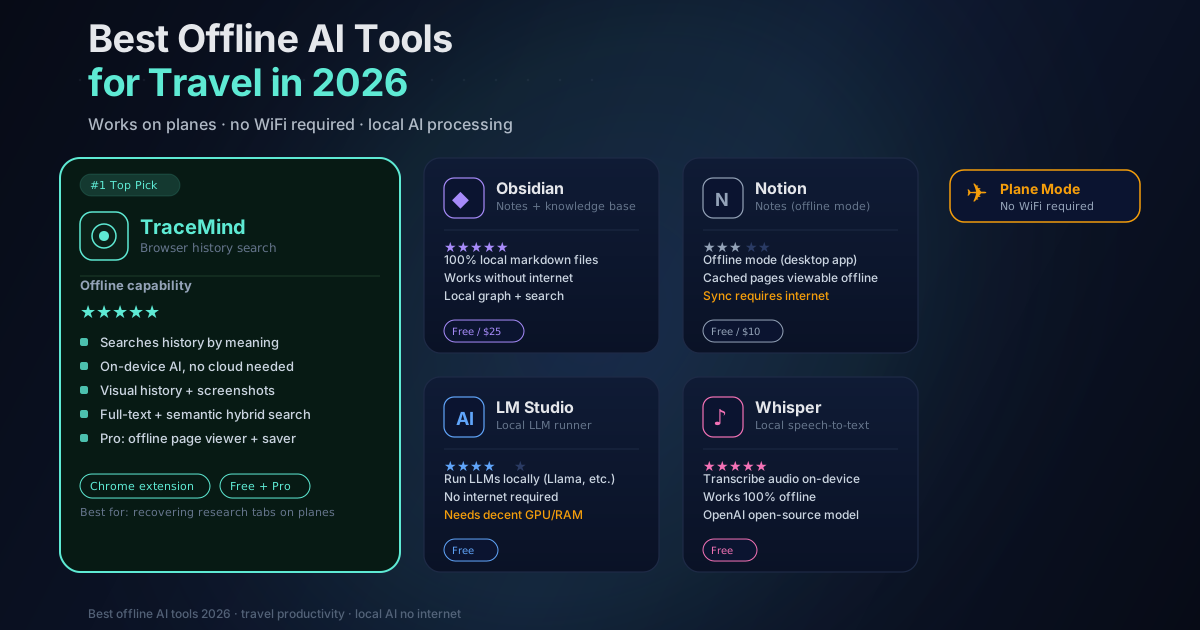
5 Best Offline AI Tools for Flights & Travel (2026 Guide)
Digital nomads and business travelers face a persistent challenge: unreliable internet connectivity during flights and travel. Even with American Airlines rolling out free WiFi on select routes starting January 2026, connection speeds remain limited (70-200 Mbps shared across the entire aircraft), and international coverage remains inconsistent. Inflight WiFi prices range from $3 to $60 depending on duration and data caps, with no guarantee of reliable performance at cruising altitude. The solution lies in local first AI tools that run entirely on your device without requiring cloud connectivity.
Why Cloud AI Fails Travelers
Most AI tools like ChatGPT and Perplexity require constant internet access because they process requests on remote servers. Traditional browser history search only scans page titles and URLs, completely ignoring actual page content, making it nearly impossible to find that article you skimmed days ago. When your connection drops at 30,000 feet or in a remote café, these cloud dependent tools become useless. Local first tools solve this by processing everything on your device with no servers, no internet dependency, and complete privacy.
The Toolkit: 5 Offline AI Tools for Productive Flights
1. TraceMind (AI Powered History Search)
TraceMind is a browser extension that transforms your browsing history into a searchable knowledge base using on device semantic AI. Unlike Chrome's basic history that only matches exact keywords in titles and URLs, TraceMind indexes full page content and understands natural language queries like "that article about EU digital nomad visas from three days ago".
How it works offline: All AI processing happens locally in your browser using IndexedDB storage. The semantic search model runs entirely on your device with no external servers. Your browsing history never leaves your computer. Pages are indexed automatically as you browse, and the extension uses hybrid search combining text indexing with vector embeddings for instant results across thousands of pages.
Why travelers love it: The free version provides semantic AI search with unlimited pages, 365-day retention, and low-quality screenshots (320×240px). Pro features ($5/month) include Ultra HD screenshots (up to 1920×1080px), notes and tags, export/import capabilities, and the Offline Page Viewer that lets you save complete page snapshots for viewing without internet. With one click, save any page including text, images, and styling, then access it anytime even at 30,000 feet. Pages are compressed using LZ string and stored in IndexedDB with sandboxed viewing for security. All data is stored locally with optional encryption, and the extension requires no cloud connection once installed.
2. Obsidian with Smart Connections (Offline Note Taking)
Obsidian stores all notes as plain markdown files on your device with zero cloud dependency by default. The Smart Connections plugin adds local first semantic AI that surfaces related notes as you write, powered by on device embeddings using the bge-micro-v2 model.
How it works offline: Smart Connections runs completely offline once embeddings are generated. Indexing and retrieval happen on device without external API keys. The plugin provides a real time Connections pane that updates as you write, Smart Lookup semantic search across your entire vault, and mobile compatibility. Advanced Pro features include inline connections, footer rails, graph views, and integration with Bases tables.
Why travelers love it: Digital nomads can preload travel vaults with visa information, contact lists, and budget trackers, then edit freely at 30,000 feet. The graph view helps visualize connections between trip planning notes and research. Optional cloud sync via iCloud, Dropbox, or Git means you control when and how data leaves your device.
3. Notion (Cloud First with Offline Mode)
Notion added offline mode in August 2025 after years of user requests. The desktop and mobile apps now support offline access for predownloaded pages, though the web browser version does not work offline.
How it works offline: Open any page in the Notion app, tap the menu, and enable "Available offline". Downloaded pages remain fully editable while disconnected. Changes save locally and automatically sync when you reconnect. The mobile app (iOS and Android) supports the same workflow, displaying recently accessed offline pages on the homepage.
Why travelers love it: Business travelers can preload CRM pipelines, content calendars, and client trackers before boarding. The offline indicator at the bottom of each page confirms local availability and shows the last sync time. This works best when you download the native desktop or mobile app rather than relying on the browser version.
4. Instapaper (Offline Reading)
Pocket is shutting down in July 2025, making Instapaper the primary offline reading tool for 2026. Instapaper has operated since 2008 and offers a clean, distraction free reading experience with full offline support.
How it works offline: Save articles at WiFi hotspots, and Instapaper performs full text extraction to strip ads and preload content. All saved articles are accessible offline on iOS, Android, macOS, and Kindle devices. The app includes adjustable font settings, color themes, text highlighting with notes, and a speed reading mode that flashes words one at a time.
Why travelers love it: Bulk save research at airport lounges, then read distraction free on the plane without buffering or battery drain. Instapaper's free version supports offline reading, while premium features include search functionality and unlimited article storage. You can export your collection as EPUB files or send articles to Kindle for e ink reading.
5. Ollama with Local LLMs (Offline AI Brainstorming)
Ollama enables running open source large language models entirely offline on your laptop. Models like Phi-3, Llama 3.2, and Mistral run locally without any cloud dependency, ideal for brainstorming during WiFi dead zones.
How it works offline: Download Ollama for macOS, Windows, or Linux, then install models using simple command line commands. Smaller models like Phi-3 are optimized for laptops without advanced GPUs. A MacBook Air M3 with 16GB RAM easily runs local LLMs. You can use the command line interface or install Open WebUI for a browser based chat experience at localhost:8080.
Why travelers love it: Generate content, brainstorm article titles, debug code, or outline strategies without any internet connection. Local LLMs excel at core text generation and analysis tasks, though they lack real time integrations and plugins found in cloud platforms. Privacy conscious nomads appreciate zero telemetry and complete data control.
Your Pre Flight Checklist
TraceMind: Indexes automatically as you browse. Visit key pages before your flight and the extension handles the rest.
Obsidian: Sync your vault through your preferred cloud service (iCloud, Dropbox, Git) and verify linked files are downloaded.
Notion: Open the desktop app, navigate to critical pages, enable "Available offline" via the menu, then verify with a test disconnect.
Instapaper: Launch the app to download all newly saved articles and confirm your offline library includes needed content.
Ollama: Download your preferred LLM model (Phi-3, Llama 3.2, or Mistral) before departure. Models range from 2-8GB depending on size.
Device settings: Manually disable WiFi before closing your laptop to force local only operations and prevent sync conflicts.
Privacy and Productivity Advantages
Local first tools prioritize privacy and reliability over cloud dependency. TraceMind keeps all data on your device with optional encryption and zero server communication. Smart Connections for Obsidian processes embeddings locally with no telemetry or data resale. Ollama runs LLMs without any external API calls or cloud providers. These tools transform flights from dead time into productive deep work sessions while maintaining complete control over your data.
Ready to work offline? Get TraceMind Free
Related Posts:
- Offline Research Workflow: Search Your Past Tabs on a Plane - Detailed offline workflow strategies
- On-Device AI for Browser Extensions - How local AI works
- Why We Chose Local-First AI: Technical Decisions Behind TraceMind - The architecture behind offline-first AI
- Best Chrome History Extension 2026 - Extension comparisons